
Key Takeaways
- The “Safari Gap”: Shopify’s native feature relies on Chrome-based tech, often failing on iPhones where 70% of fashion D2C sales happen.
- Prediction vs. Reaction: Native features wait for a “hover” (saving milliseconds). Smart Prefetch predicts clicks before they happen (saving seconds).
- Battery Safety: Smart Prefetch intelligently pauses on low battery or “Data Saver” modes; native features often don’t, potentially frustrating users.
Recently, Shopify has introduced native support for Speculation Rules. If you’re a merchant or developer who obsesses over speed (like we do) and want to improve your shoppers experience to next level, you might be asking: “Do I still need a dedicated app like Smart Prefetch if Shopify does this out of the box?”
It’s a valid question. And the honest answer is: It depends on whether you want “Basic Cruise Control” or “Tesla Autopilot.”
While Shopify’s native implementation is a great step forward for the web, it relies on the same “touch/hover” signals used by older hover-based preloading apps like Booster, which struggle to deliver instant speeds on mobile devices. It has significant technical gaps-especially for fashion and lifestyle brands with mobile-heavy traffic. Here is why rely on the native toggle might be costing you sales on your most important devices.
Prefer watching over reading?
We recorded a full breakdown of how the Shopify Native Speculation Rules can give you limited benefits:
Difference 1. The “Safari Gap”: Failing Your Most Valuable Customers
The Speculation Rules API is a modern browser standard, but it is primarily supported by Chrome, Edge and Opera. Support for Safari (especially on older iOS versions) and Firefox is significantly limited or non-existent.
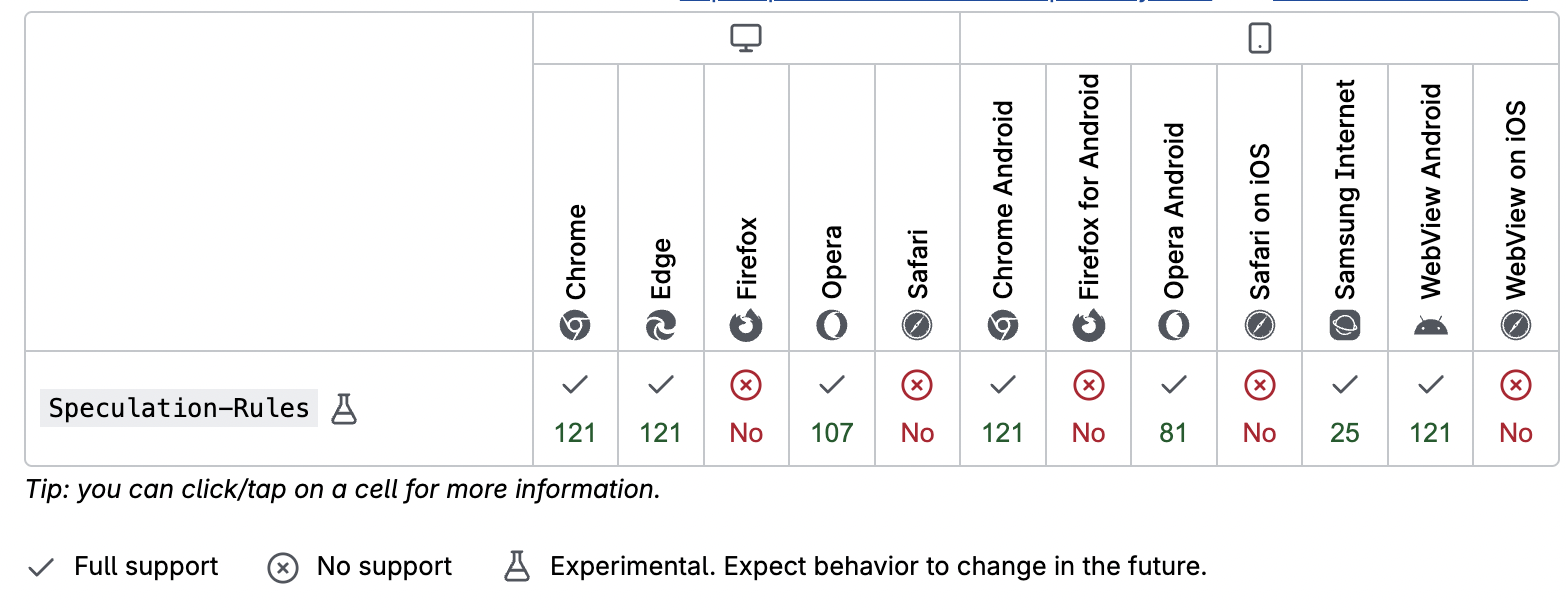
Source: MDN
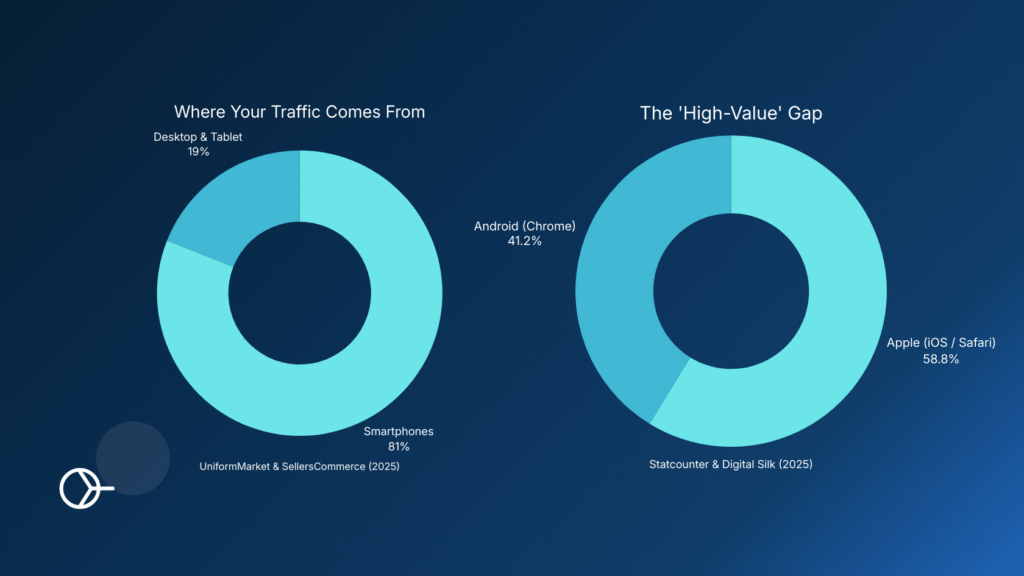
Why this kills conversions: If you run a fashion or lifestyle D2C brand, check your analytics. You likely see that 60-70% of your highest-value traffic comes from iPhones (Safari).
Shopify’s native feature relies heavily on this new API. If a customer visits your store on an iPhone where this API isn’t fully supported, the “native speed boost” simply doesn’t happen. They get the standard, slow loading experience.
The Smart Prefetch Difference: We built a “Triple-Fallback System.”
- We check for Speculation Rules support first (for Chrome users).
- If that fails, we fallback to standard
<link rel="prefetch">tags. - If that fails (like on older iPhones), we use a standard
fetchmechanism to force the preload.
Result: Your site feels instant for everyone, not just people using Chrome on a desktop.
Difference 2. Hover vs. Prediction: The 5-Second Advantage
Most native “instant page” features work on Hover. The browser waits for the user’s mouse to touch a link, and then starts downloading the page.
- Hover Latency: This saves about ~200 milliseconds. It helps, but it’s not magic.
- Mobile Problem: You cannot “hover” with your thumb on a smartphone.
The Smart Prefetch Difference: We don’t wait for a hover. Our AI analyzes your store’s traffic patterns to predict where a user will go next seconds before they even move their finger.
If a user lands on a “Summer Collection” page, our AI knows there is a 45% chance they will click the first product. We preload that product immediately. By the time their thumb finally taps the screen 3 seconds later, the page is already 100% loaded in the background.
Difference 3. Being a “Good Citizen” on User Devices
Aggressive preloading can be dangerous. If you preload every link on a page, you might drain your customer’s battery or eat up their limited mobile data plan. Native implementations can sometimes be “dumb,” prefetching aggressively without checking the device’s health.
The Smart Prefetch Difference: Our script is ethical. Before we fetch a single byte of data, we run safety checks:
- Low Battery Check: Is the user’s phone below 20%? If yes, we pause to save their battery.
- Data Saver Mode: Is the user on a limited data plan? If yes, we respect that and stand down.
We speed up your site without slowing down your customers’ phones.
Conclusion: You Need Specialized Speed
Shopify’s native features are excellent for baseline performance. But in the competitive world of e-commerce, a baseline isn’t enough. You need coverage for iPhones, AI prediction for mobile users, and safety checks for battery life.
If you are ready to move from Cruise Control to Autopilot, Smart Prefetch is your engine.
| Feature | Shopify Native Speculation Rules | Smart Prefetch |
| Custom Inclusion/Exclusion | No Control. It’s an “All or Nothing” system. You cannot exclude specific heavy URLs or force-include high-priority pages. | Granular Rules Engine. Create simple “Always Prefetch” or “Never Prefetch” rules. Perfect for excluding pages with pretty heavy scripts/media. |
| Platform Compatibility | Liquid Themes Only. Does not work on Headless (Hydrogen) or custom storefronts out of the box. | Universal. Works on Liquid, Headless, Hydrogen, and even WooCommerce/WordPress. |
| Eagerness Control | None (Hard-coded). Locked to “Conservative” (requires touch/click). You cannot change this easily. | Fully Customizable. Set different eagerness levels (Low/Medium/High) per device type via a simple UI. |
| iPhone/Safari Support | Zero. Relies entirely on the Chrome-based API. If the browser is Safari (iOS), nothing happens. | 100% Support. Uses a “Triple-Fallback” system to force pre-loading on Safari and older iOS devices. |
| Trigger Mechanism | Reactionary (Touch/Click). Begins fetching only when the user touches the screen (saving ~50-100ms). | Predictive (AI). Begins fetching before interaction based on user behavior (saving 1-3 seconds). |
| Safety Checks | Basic. Relies on browser defaults. Can waste data/battery if the browser is aggressive. | Advanced. Checks for Data Saver Mode, Low Battery (<20%), and Network Speed (2G/3G). |
| Implementation | Header-Based. Injected via HTTP Headers. Difficult for non-developers to debug or modify. | Script-Based. Managed via an App Dashboard. Easy to toggle on/off without touching code. |
| LCP Prefetching | Reactive. Prefetching LCP is possible only after the page is navigated. | In Roadmap. Prefetching LCP of the next page even before navigation starts. |
Frequently Asked Questions
Q: Will Smart Prefetch conflict with Shopify’s native Speculation Rules? A: No. Smart Prefetch is designed to work alongside or on top of native settings. However, for the best performance and to avoid double-downloading, our “Triple-Fallback” system ensures we only trigger the most efficient method available for that specific user’s device.
Q: Does this work on custom headless storefronts? A: Yes, absolutely! Smart Prefetch is built to be flexible and works effectively on headless storefronts. You maintain full control: if there are specific dynamic pages you don’t want to prefetch, you can easily exclude those URLs directly from your Smart Prefetch Dashboard. For more complex custom architectures, you can always connect with our support team for a tailored integration.
Q: How do I know it’s working? A: You can verify it yourself! Open your browser’s “Network” tab while browsing your store. You will see requests for the next page appearing in the background before you click. Or, check your Smart Prefetch Dashboard for real-time stats on “Accelerated Pageviews”.
Read More on Our Blog: