

Key Takeaways for D2C Brands:
- Speed has Two Parts: A fast Shopify store requires two things: optimized infrastructure (small files) and eliminated network latency (instant connection).
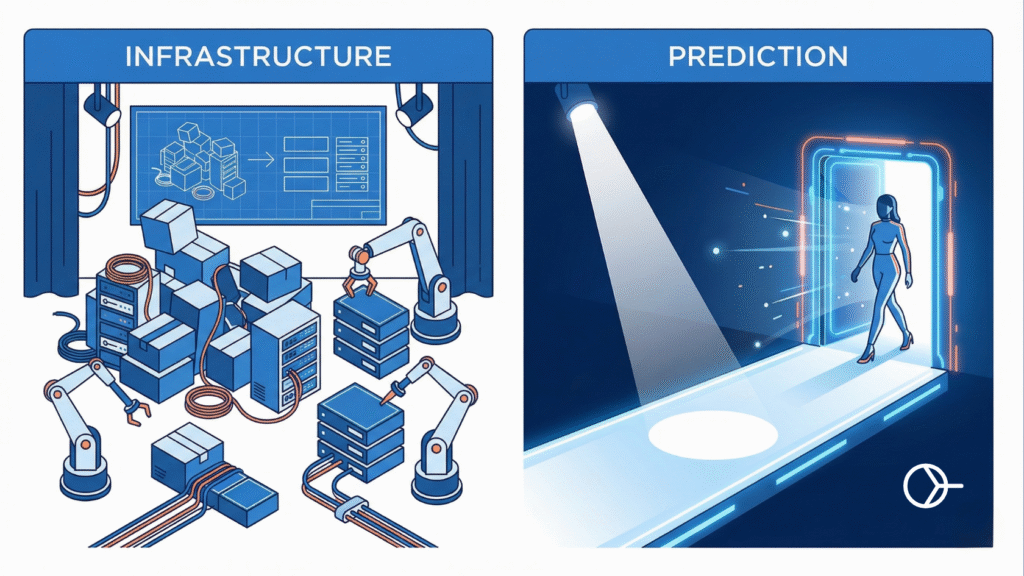
- Hyperspeed is the “Optimizer”: It handles the infrastructure-compressing images, minifying code, and organizing assets so your page is physically smaller and easier to load.
- Smart Prefetch is the “Predictor”: It handles latency by using AI to guess where the user will click next and loading that page before they tap, creating an “instant” feel.
- Better Together: Using Smart Prefetch on a site unoptimized by Hyperspeed wastes data. Using Hyperspeed without Smart Prefetch still leaves users waiting for network connections on every click. You need both for the ultimate competitive edge.
Introduction
If you run a small to mid-sized D2C fashion or apparel brand on Shopify, you know the drill. Your imagery has to be stunning. Your lookbooks need high-resolution photos, your product pages need detailed zoom-ins, and your brand videos need to be crisp.
But you also know the painful reality of e-commerce: heavy visuals equal slow load times. And in the fashion world, slow load times mean abandoned carts. A shopper browsing Instagram on their iPhone isn’t going to wait 4 seconds for your summer collection page to load. They’re gone.
In your quest for a faster Shopify store, you’ve likely encountered the two heavyweights in the Shopify App Store speed category: Hyperspeed and Smart Prefetch. (or perhaps the popular Booster Page Speed Optimizer Review).
Often, store owners view these apps as competitors. It’s an “either/or” decision based on budget or feature lists.
Here is the honest truth that most developers won’t tell you straight up: Viewing them as competitors is a mistake that is costing you conversions.
If you want a truly elite, instant-loading experience that rivals top-tier brands, you shouldn’t be choosing between Hyperspeed and Smart Prefetch. You should be using them together.
This guide will break down exactly why these two tools are not rivals, but rather the ultimate power couple for your Shopify store’s performance stack.
Prefer watching over reading?
We recorded a full breakdown of the “Speed Stack” strategy below (including the Relay Race diagram).
The Two Enemies of Speed: Bloat and Latency
To understand why you need both apps, we first need to understand what actually makes a website slow. When a customer taps a link on your store, two distinct things have to happen before they see the next page.
1. The Bloat Problem (Asset Weight): The browser has to download all the “stuff” required for the new page-the HTML, the CSS for styling, the JavaScript for interactivity, and crucially for fashion stores, the high-quality images. The heavier this “stuff” is, the longer it takes to download. If your homepage is 5MB because of uncompressed hero banners, it’s going to be slow no matter what internet connection the user has.
2. The Latency Problem (Network Wait Time): Before any of that “stuff” can even start downloading, there is a delay. The browser has to send a request across the internet to Shopify’s servers, the server has to process it, and then send a response back to start the data transfer. This round-trip time-the time spent just waiting for the connection to happen-is called latency.
You cannot solve speed by only addressing one of these problems.
- If you have a super-optimized, lightweight page (low bloat), but high network latency, the user still waits after clicking before anything happens.
- If you have zero latency, but the page is massive and unoptimized (high bloat), the download will take forever even after it starts instantly.
This is where the synergy between Hyperspeed and Smart Prefetch becomes undeniable.
The Comparison: Optimization vs. Prediction
| Feature | Hyperspeed (The “Housekeeper”) | Smart Prefetch (The “Mind Reader”) |
| Primary Enemy | Bloat (Large files, heavy code) | Latency (Network wait time) |
| How it Works | Compresses images & delays scripts to make files smaller. | Predicts user behavior & downloads the next page before they click. |
| When it Kicks In | During the initial page load. | Milliseconds before the user clicks a link. |
| Core Web Vital Focus | LCP (Largest Contentful Paint) – Makes the first page appear faster. | INP (Interaction to Next Paint) – Makes the next page open instantly. Helps LCP and TTBF as well since the page is prefetched. |
| Risk of Conflicts | Medium (Aggressive script blocking can sometimes break themes). | Low (Uses native browser APIs that run safely in the background). |
| The Result | A lighter, more efficient website. | A website that feels “app-like” and instant. |
| Verdict | Required for a healthy foundation. | Required for a premium user experience. |
Hyperspeed: The Master of “Bloat Reduction”
Think of Hyperspeed as your store’s strict nutritionist and personal trainer combined. Its primary job is infrastructure optimization. It looks at the code and assets that make up your Shopify theme and puts them on a serious diet.
For a fashion brand, Hyperspeed is essential because you cannot compromise on visual quality. You need those lifestyle shots. Hyperspeed helps you keep them without tanking your performance scores.
What Hyperspeed excels at:
- Image Compression: It takes your high-res product photos and compresses them without visible quality loss, significantly reducing the page weight.
- Minification: It squeezes unnecessary spaces and comments out of your JavaScript and CSS files, making them smaller and faster for the browser to read.
- Lazy Loading: It ensures that images further down the page (like in your “You May Also Like” section) don’t load until the user actually scrolls near them.
- Critical CSS: It figures out the bare minimum styling needed to paint the “above the fold” content and loads that first, making the page look ready faster.
By using Hyperspeed, you are solving the Bloat Problem. You are ensuring that when the browser asks for a page, the package it receives is as small and tight as possible.
According to Google’s web.dev documentation on fast load times, optimizing asset size is foundational to improving metrics like Largest Contentful Paint (LCP).
However, Hyperspeed, on its own, cannot stop the user from waiting for the network connection every time they click a new link. It makes the suitcase lighter, but it doesn’t ship it any faster.
Smart Prefetch: The Master of “Latency Elimination”
If Hyperspeed is the nutritionist, Smart Prefetch is the psychic assistant who knows what you want before you ask for it.
Smart Prefetch doesn’t touch your image quality or your code’s file size. It focuses entirely on the Latency Problem-the time lost between pages. It uses advanced AI modeling and the modern Speculation Rules API to predict where your customer is going to click next.
How Smart Prefetch works:
- Predicts User Intent: Instead of waiting for a click, our AI analyzes user behavior—like mouse velocity and hover patterns—to predict exactly where the customer is going next.
- Fetches in the Background: Milliseconds before the user clicks, Smart Prefetch triggers the browser to silently download the HTML code for that specific product or collection page.
- Eliminates Network Wait: When the customer actually clicks, the browser doesn’t need to reach out to the server. The page is already there, loading instantly with zero latency.
Imagine a user lands on a “Women’s Summer Dresses” collection page. Based on aggregated data, Smart Prefetch’s AI knows that 60% of users on this page will click on the top-left product, and another 20% will click to filter by size.
Before the user even moves their mouse or lifts their thumb, Smart Prefetch instructs the browser to quietly download those high-probability next pages in the background.
When the user does tap that dress they like, the page doesn’t need to be requested from the server. It doesn’t need to wait for network latency. It is already sitting in the browser’s memory, ready to be swapped in instantly.
This creates a feeling of startling speed-an “app-like” experience where navigation feels instantaneous. This directly improves Interaction to Next Paint (INP), a crucial Core Web Vital.
If you aren’t using Smart Prefetch, every single click your customer makes involves a compulsory waiting period while the network connects. Across a 10-step buyer journey, those seconds add up to major friction and lost sales.
A Note on Internal Navigation: Smart Prefetch is designed to speed up movement within your site. It ensures that once a user lands on your homepage or a landing page, their subsequent journey through catalogs and product pages is seamless.
The “Safari Gap”: Why Reactionary Tools Aren’t Enough
You might argue, “But doesn’t Shopify native support mobile touches?”
Technically, yes. Shopify’s native feature listens for a touchstart event. This means it starts downloading the next page the moment your customer’s finger hits the screen.
But ask yourself: How long does a tap take? The time between a user touching the screen and lifting their finger is roughly 100 milliseconds. That is the only head-start the native tool gets. On a 4G connection, 100ms is barely enough to start the request, let alone finish downloading the page.
Smart Prefetch changes the game from “Reaction” to “Prediction.” Instead of waiting for the physical tap, our AI predicts where the user is likely to go next and starts the download seconds before they act.
For a fashion brand dependent on mobile traffic, the difference between “starting to load when they tap” (Native) and “already loaded when they tap” (Smart Prefetch) is the difference between a fast site and an instant one.
The Power Couple: Why They Work Better Together
Now that we understand their individual strengths, let’s look at why they are necessary complements.
Scenario A: Hyperspeed Only (The Optimized Wait)
You have optimized all your images and minified your code with Hyperspeed. Great job. A user on an iPhone clicks a product link. The browser has to establish a network connection (wait 200ms-500ms latency). Then it downloads the optimized page very quickly. Result: The user still feels a delay every time they click. It’s a shorter delay, but it’s not instant.
Scenario B: Smart Prefetch Only (The Bloated Instant)
You don’t optimize your assets, so your product page is 4MB. You use Smart Prefetch. The AI correctly guesses the next page and starts downloading that 4MB file in the background. Because the file is huge, it consumes a lot of the user’s data and battery in the background. If they click too fast, the huge file might not finish downloading in time, and they still wait. Result: You risk wasting user data and potentially slowing down the current page by clogging the bandwidth with massive background downloads.
Scenario C: The Power Couple (Instant & Efficient)
You use Hyperspeed to get your product page down to a lean 500KB. You use Smart Prefetch to predict the next click. Smart Prefetch tells the browser to fetch the next page in the background. Because Hyperspeed has made that page so small, it downloads almost instantly in the background without hogging bandwidth. When the user clicks, the page appears immediately. Result: The ultimate e-commerce experience. Instant navigation with minimal data overhead.
The Runway Analogy:
Imagine your e-commerce store is a fashion runway show.
- Hyperspeed is the backstage crew. They ensure the models (your pages) are dressed efficiently, the clothes fit perfectly, and everyone is ready to go without any excess baggage.
- Smart Prefetch is the show director. They are looking ahead, cueing the next model to start walking towards the curtain before the current model has even finished their turn at the end of the runway.
If you only have the backstage crew (Hyperspeed), the models look great, but there’s an awkward pause between each one stepping out.
If you only have the director (Smart Prefetch), there are no pauses, but the models might step out wearing ill-fitting clothes because the backstage was chaotic.
You need both for a flawless show.
Implementation Strategy: The Perfect Handoff
Many store owners worry that running two speed apps will cause a “conflict” or a race condition. However, because Smart Prefetch and Hyperspeed operate at different stages of the user’s journey, they actually perform a perfect “handoff.”
Think of it like a relay race:
- Before the Click (Smart Prefetch): Smart Prefetch uses AI predictive technology to anticipate the user’s intent. It analyzes navigation patterns to silently download the HTML file in the background-before the user even clicks. It handles the network waiting time.
- After the Click (Hyperspeed): Once the page actually starts to render, Hyperspeed kicks in. Its “LCP Preload” feature detects the most important image (usually the main product photo) and prioritizes it so it appears instantly.
The Verdict: There is no overlap. Smart Prefetch handles the prediction and connection, and Hyperspeed handles the rendering.
Configuration Tip: You can safely keep Hyperspeed’s “Preload LCP” (or similar “Lazy Load” settings) turned ON. It acts as the perfect second stage to the head start provided by Smart Prefetch.
For more insights on optimizing your setup for Shopify, check out our knowledge guide.
Conclusion
In the competitive world of D2C fashion, customer experience is the only sustainable differentiator. Speed is the foundation of that experience.
Don’t fall into the trap of thinking you have to choose between optimizing your assets and predicting user behavior. The top 1% of Shopify stores aren’t making that choice-they are utilizing every tool available to shave off milliseconds.
Hyperspeed provides the optimized infrastructure your beautiful imagery demands. Smart Prefetch provides the predictive intelligence that today’s mobile-first shoppers expect.
Stop looking for an “all-in-one” compromise. Build a best-in-class stack. Use Hyperspeed to get lean, and use Smart Prefetch to get fast. Your conversion rate will thank you.
Important FAQ
Q: Will running two speed apps slow down my site? A: No, if they are complementary apps like these two. Hyperspeed works mostly on the server-side or by modifying assets before they are served. Smart Prefetch uses a tiny, asynchronous script that runs after the page has loaded to predict future navigation. They operate in different lanes.
Q: I’m a small brand. Is this overkill for me? A: If you are in fashion and apparel, no. Visuals are your lifeblood, and mobile traffic is likely your primary channel. The tolerance for slow mobile experiences is near zero, regardless of your brand size. Providing an “app-like”, instant experience is one of the best ways for a smaller brand to punch above its weight and compete with giants.
Q: Does Smart Prefetch use up my customers’ mobile data? A: Smart Prefetch is designed to be a “good citizen.” It includes safety checks and will not prefetch pages if it detects the user has Data Saver mode enabled or is running on Low Battery. It respects your customer’s device constraints while still pushing for maximum speed. Furthermore, when combined with Hyperspeed, the pages it does prefetch are significantly smaller, minimizing data usage.
Q: Doesn’t Shopify already do this natively? A: Shopify recently introduced native support for Speculation Rules, which is a fantastic step forward. However, their native implementation is “reactionary”-it waits for a user to hover (on desktop) or touch the screen (on mobile) to begin fetching.
Smart Prefetch is “predictive.” Our AI identifies high-probability clicks and loads them before the user’s thumb even touches the glass. On mobile networks where every millisecond counts, this difference between “reacting to a tap” vs. “predicting the tap” is often the difference between a load time of 200ms vs. instant. Additionally, Smart Prefetch offers a robust fallback system for iPhones (Safari) where native support can sometimes be inconsistent.