Shopify Integration
Integrate Smart Prefetch with your Shopify store in just a few clicks. No coding required.
1. Quick Installation
Integrating with Shopify is seamless. Our app handles the script injection automatically.
- Install the Smart Prefetch app from the Shopify App Store.
- Once installed, the app will automatically enable prefetching for your store.
- Wait for traffic to start flowing to see performance metrics in your dashboard.
2. Video Guide
3. Detailed Configuration
Install from Shopify App Store
- Navigate to the Smart Prefetch app listing on the Shopify App Store.
- Click the “Add app” button.
- Follow the prompts to approve the app’s permissions and complete the installation.
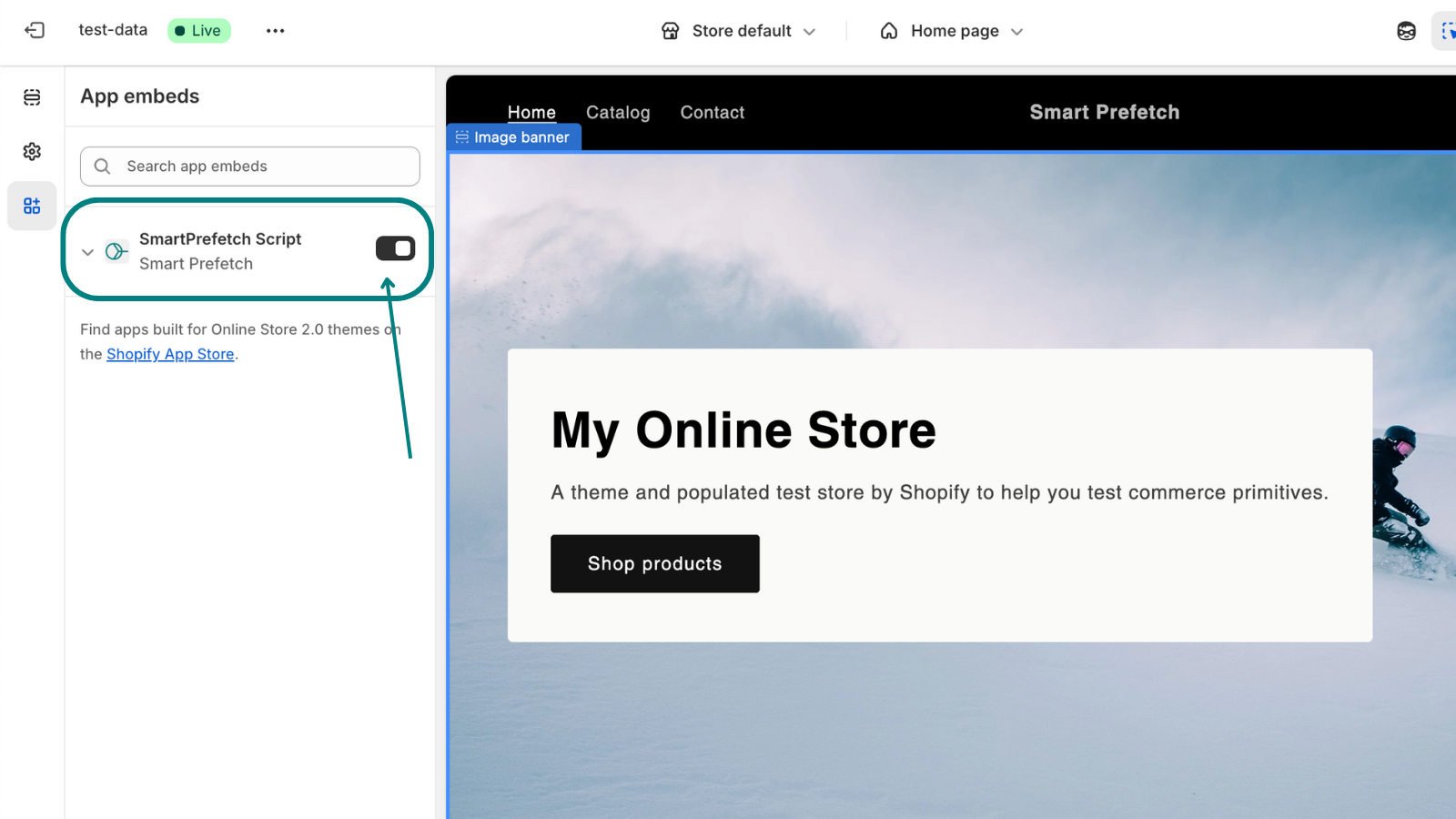
Activate App Embed in Theme Customizer
This is a crucial step to ensure Smart Prefetch can inject its necessary code into your store.
- From your Shopify admin, go to Online Store > Themes.
- Find your current theme and click the “Customize” button.
- In the theme customizer, look for the “App embeds” section. This is usually located on the left-hand sidebar or within the settings menu (it might look like a puzzle piece icon).
- Locate the “Smart Prefetch” toggle.
- Enable the “Smart Prefetch” toggle.
- IMPORTANT: Click the “Save” button in the top right corner of the theme customizer to apply your changes.
4. Verification (Optional)
You can skip this step if you are not comfortable with developer tools. The dashboard will automatically update once traffic is detected.
To confirm Smart Prefetch is active and working correctly immediately:
- Open your Shopify store in a web browser.
- Right-click anywhere on the page and select “Inspect” (or “Inspect Element” / “Developer Tools”).
- Navigate to the “Network” tab within the developer tools.
- Refresh the page.
- In the network requests filter box, type
index.min.js. - Look for a script named
index.min.jsoriginating fromhttps://pub-cdn.smartprefetch.link/.
If you see this script loading, Smart Prefetch is successfully integrated!
5. Compatibility with Apps You Already Use
Smart Prefetch is compatible with most of the apps you use on the Shopify store. No additional settings are needed. We have reviewed some of the related performance apps that you can explore:
- Booster Review – You can use both. We have explained how to use Smart Prefetch to fill the “Mobile Gap” that Booster leaves behind.
- Hyperspeed Review – Using Smart Prefetch on a site unoptimized by Hyperspeed wastes data. Using Hyperspeed without Smart Prefetch still leaves users waiting for network connections on every click. You need both for the ultimate competitive edge.
Compatibility FAQ
Detailed information about how Smart Prefetch works with your existing Shopify apps and tools.
Shopify Speed Optimization FAQ
Common questions about improving Shopify store performance with predictive prefetching.